Netflix Clone – Source Code (HTML, CSS, JS)
Table of Contents
Introduction to Netflix Clone:
Creating a Netflix Clone using HTML, CSS, and JavaScript is one of the most popular beginner-to-intermediate front-end development projects. It helps developers understand real-world UI design concepts such as layout structuring, responsive design, navigation bars, banner sections, and scrollable content rows — all inspired by Netflix’s modern and engaging interface.
Whether you’re building your portfolio, learning the fundamentals of web design, or preparing for front-end development interviews, this project will give you hands-on experience that goes beyond theory.
In this blog, you’ll get:
A fully functional Netflix UI clone.
Clean and reusable HTML, CSS, and JavaScript code.
A step-by-step walkthrough of the features and structure.
Let’s dive in and build a sleek, Netflix-style homepage from scratch!
About Netflix Clone Project:
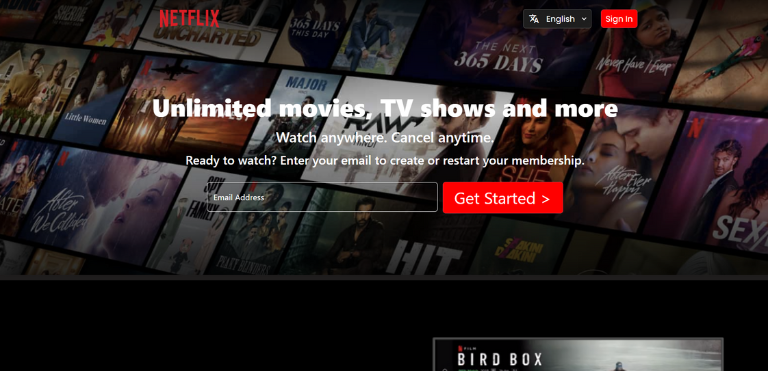
This Netflix Clone project is a static front-end replica of the Netflix homepage. Built entirely using HTML, CSS, and JavaScript, it closely resembles the visual layout and design of Netflix’s user interface. It is designed to demonstrate responsive layouts, dynamic content loading, and interactive UI components.
Key Highlights:
Header Navigation Bar: Features a logo and navigation links similar to the official Netflix site.
Hero Banner Section: Displays a featured show with a title, description, and action buttons like “Play” and “More Info.”
Trending Movies Row: A scrollable row showcasing movie thumbnails, dynamically loaded using JavaScript.
Hover Effects: Subtle zoom effect on movie posters to enhance interactivity.
Responsive Design: Adjusts layout and content presentation for various screen sizes, including mobile and desktop.
Technologies Used:
HTML – Provides the structural markup for the page
CSS – Handles the visual styling and responsiveness
JavaScript – Enables dynamic content loading and basic interactivity
Note: This project is focused purely on the front-end UI and does not include streaming features or backend functionality. It is ideal for learning and showcasing front-end development skills.
Key Features of Netflix Clone:
The Netflix Clone is a front-end project designed to replicate the core UI elements of the original Netflix homepage. Below are the key features implemented:
1. Responsive Header Navigation
Includes a fixed top navigation bar with the Netflix logo and links to Home, TV Shows, Movies, Latest, and My List. It stays visible while scrolling and adjusts to screen sizes.
2. Hero Banner Section
A visually appealing banner at the top of the page displays a featured show with its title, description, and functional buttons like “Play” and “More Info.”
3. Scrollable Movie Rows
Movies or TV shows are displayed in horizontally scrollable rows, similar to Netflix’s “Trending Now” or “Watch Again” sections. These thumbnails are dynamically rendered using JavaScript.
4. Hover Effects on Thumbnails
Movie posters zoom slightly on hover, offering a smooth and interactive visual effect that mimics the Netflix user experience.
5. Clean and Modern UI Design
Styled using CSS with attention to layout, typography, spacing, and contrast to ensure the interface looks polished and user-friendly.
6. Mobile-Friendly Layout
Fully responsive layout built with flexbox, ensuring it works seamlessly on desktops, tablets, and mobile devices.
7. Dynamic Content Loading
JavaScript is used to populate poster images dynamically, simulating how a real application might fetch and display content from an API.
Tech Stack – WeatherWiz:
The Netflix Clone project is built using a simple and powerful front-end technology stack. It focuses on clean structure, styling, and interactivity without any backend or frameworks.
1. HTML (HyperText Markup Language)
Used to create the structure of the web page, including headers, navigation bar, banner, movie rows, and buttons.
2. CSS (Cascading Style Sheets)
Responsible for styling the layout and elements. It handles:
Responsive design using Flexbox
Visual effects like hover animations
The overall theme and layout positioning
3. JavaScript (Vanilla JS)
Adds dynamic behavior to the project, such as:
Loading and displaying movie poster images
DOM manipulation for inserting content
Interactivity for future enhancements
Step-by-Step Guide to Running the Project
Follow these easy steps to get the Netflix Clone project running on your computer:
- Clone the Project – github
- Open in code editor(VS-Code) you can use any code editor based on you choice.
- If required any modification in code you can do that.
- Click go live in vs code or else click on index.html in folder. Run how you are running you html code.
Future Enhancements: What's Next for Netflix Clone?
While the current version of the Netflix Clone covers the basic layout and interactivity of the homepage, there are several ways it can be improved and expanded to make it more dynamic and closer to a real-world application.
1. API Integration
Connect the project to a real movie database API such as The Movie Database (TMDb) to fetch live movie data, thumbnails, titles, and descriptions dynamically.
2. User Authentication
Implement sign-up and login functionality using Firebase Authentication or a custom backend. This would allow user-specific features like watch lists or profiles.
3. Video Playback Support
Add embedded video previews or use platforms like YouTube or a video player library to simulate actual streaming functionality for trailers or sample content.
4. Search Functionality
Introduce a search bar to allow users to find specific shows or movies by title or genre.
5. Genre Filters and Categories
Add filtering options so users can browse by categories like Action, Comedy, Drama, and more — just like on Netflix.
6. User Dashboard or Profiles
Create multiple user profiles with personalized recommendations and recently watched lists, mimicking the multi-user feature in Netflix.
7. Backend and Database Integration
Use technologies like Node.js, Express, and MongoDB or MySQL to store user data, watchlists, and preferences.
8. Dark Mode Toggle
Introduce a theme switcher to allow toggling between light and dark modes for better accessibility and customization.
Source code and Output Video:
Output Screenshot:
Conclusion: Why Netflix clone is the Ultimate
Building a Netflix Clone is more than just replicating a popular UI — it’s a hands-on learning experience that helps you master essential front-end development skills. From layout structuring and responsive design to dynamic content rendering and user interface interactivity, this project covers the core foundations of web development in a practical way.
Whether you’re a beginner looking to strengthen your HTML, CSS, and JavaScript skills, or an aspiring developer preparing for job interviews, the Netflix Clone serves as a powerful portfolio project that demonstrates both creativity and technical ability.
By completing this project, you’re not only building a visually impressive UI but also setting the stage for more advanced features like API integration, authentication, and backend development.
Start simple, iterate gradually, and turn this static clone into a full-fledged streaming platform simulation. The possibilities are endless — and that’s what makes the Netflix Clone the ultimate frontend project.
Share Your Thoughts Below
Recent Projects